Reels Guides
Instagram Reel Dimensions: Size, Ratio & Quality
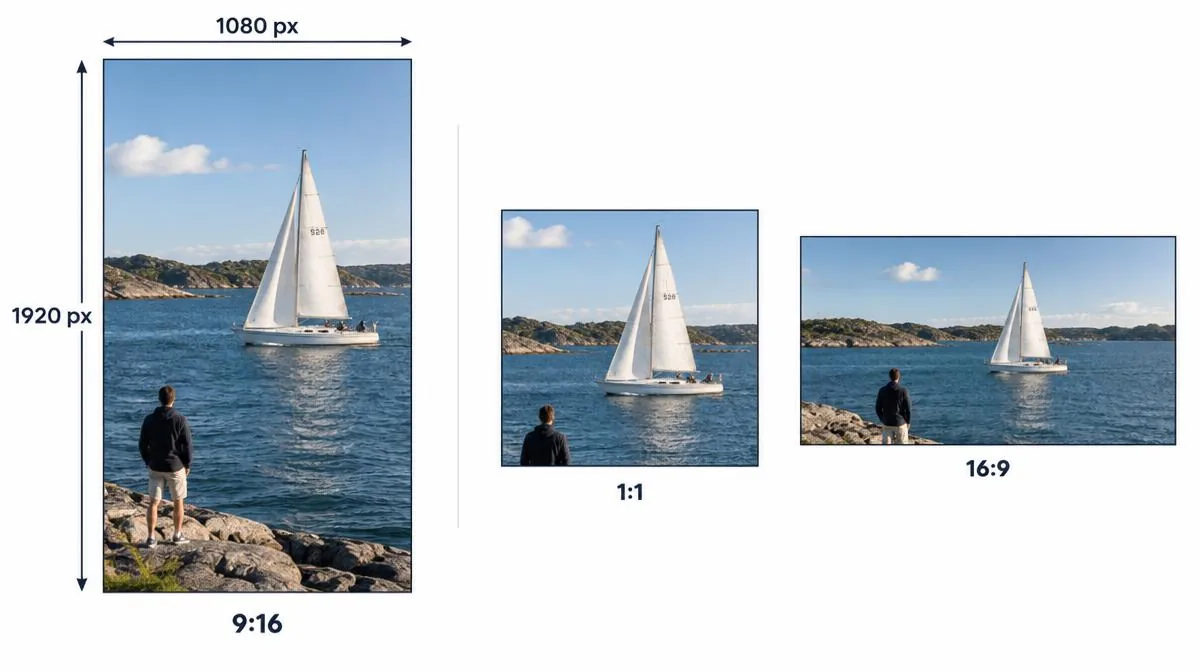
Use Instagram Reel dimensions of 1080 × 1920 pixels with a 9:16 aspect ratio for a full-height vertical video. This is a recommended production canvas, not a promise about every saved file.
Secondary sources distinguish Instagram's reported minimums from the recommended export size. Check cover previews, frame rate and the actual source before judging quality.
Compare Reel size, aspect ratio and minimum resolution
The recommended Instagram Reel dimensions pair a 1080-pixel width with a 1920-pixel height. Divide width by height to get 9:16.
Secondary sources report an accepted aspect-ratio range from 1.91:1 to 9:16, plus minimum resolution and frame rate. Accepted does not mean full-screen.
Choose the vertical canvas when you want your image to fill a portrait viewing area. Landscape footage may leave unused space.
| Specification | Value | How to interpret it |
|---|---|---|
| Recommended vertical canvas | 1080 × 1920 pixels | Production recommendation, not a guaranteed delivered rendition |
| Full-height aspect ratio | 9:16 | Width-to-height proportion |
| Accepted upload ratios | 1.91:1 through 9:16 | Secondary reporting of Help guidance; current official body not independently verified |
| Minimum resolution | 720 × 1280 pixels | Vimeo's reported portrait example, not a verified current official requirement |
| Minimum frame rate | 30 FPS | Secondary reporting of Help minimum |
| Cover preview | Check current app previews | Cover and video dimensions differ; current cover pixel guidance unverified |
Set 1080 × 1920 pixels without stretching landscape footage
Create a 9:16 project before editing, then place your footage inside it. Keep people and important objects within the visible composition.
For horizontal clips, choose crop-to-fill or fit-with-background deliberately. Cropping removes edges; fitting preserves the picture but adds unused space.
Never stretch a 16:9 image into 9:16 by changing width and height independently. Faces and circles will distort.
A 1920 × 1080 file is landscape, while 1080 × 1920 is portrait. The same pixel count does not mean the same orientation.
- Set the editor canvas to portrait 9:16 and 1080 × 1920 pixels.
- Review crop-to-fill and fit previews before adding captions or logos.
- Export a short sample and inspect it on a phone before exporting the full Reel.
| Source example | Fit inside 1080 × 1920 | Crop to fill the same canvas |
|---|---|---|
| 9:16 portrait | 1080 × 1920; fills the canvas | No ratio-driven crop |
| 4:5 portrait | 1080 × 1350; 570 pixels of total vertical space | Crop left and right edges to reach 9:16 |
| 1:1 square | 1080 × 1080; 840 pixels of total vertical space | Crop left and right edges to reach 9:16 |
| 16:9 landscape | 1080 × approximately 608; substantial vertical space | Keep roughly the central 32% of the original width |
Preview Reel cover size across profile and feed crops
Reel cover size describes a thumbnail, not the video frame itself. Choose sharp artwork and check the current cover-selection preview.
Start cover artwork on a 1080 × 1920 portrait canvas as an editing recommendation, not a universal Instagram cover requirement.
Profile-grid and feed previews can use different crops from the full-screen Reel. Interface changes can make older square-only templates misleading.
For a talking-head cover, center the face and a short title. Adjust their placement until both remain readable in available previews.
When selecting a video frame as the cover, check that its text survives the thumbnail crop. A sharp frame can still produce unreadable lettering.
Keep captions inside a practical Reel safe zone
A Reel safe zone keeps important text away from interface overlays and preview edges. The app's controls can cover usable video pixels.
Reserve room near the bottom for captions and account information, and near the side for interaction controls. Preview the actual composition.
For a tutorial Reel, keep the subject central, place the title above it and move subtitles away from bottom controls.
Then preview with account information and interaction buttons visible. Move any covered words inward; this example does not establish fixed safe margins.
Organic Reels and ad placements do not share one guaranteed pixel-safe rectangle. Caption length, device layout and platform changes affect visibility.
Use current placement previews for ads rather than applying an advertising template to every organic Reel. No fixed margin guarantees every device.
Choose export settings, frame rate and upload quality
A practical export starts with 1080p portrait video in an MP4 container. H.264 video and AAC audio offer broad playback compatibility.
Keep a consistent frame rate that matches your intended motion and meets the stated minimum. Exporting 30 FPS footage at 60 FPS adds no captured detail.
Use your editor's quality preset for 1080p instead of treating one bitrate as an official requirement. Motion and scene complexity change bitrate needs.
Enable Upload at highest quality if your current Instagram app offers that setting. Menu names and availability can vary between versions.
Compare the local export with the uploaded result after processing. A high-quality upload setting does not prevent all platform compression.
Inspect downloaded Reel resolution instead of trusting HD labels
Instagram Reel dimensions in a saved file can differ from the creator's export. The available public rendition determines the delivered picture size.
For a permitted public clip, the Instagram Reels downloader retrieves an available source file. It cannot reconstruct detail that compression already removed.
Check the file's width, height and orientation in a media inspector or player. Compare playback at the same display size before blaming the transfer.
Our how to download Instagram Reels guide covers saving methods and device folders. This article stays focused on dimensions and picture quality.
An Instagram video downloader does not turn a 720p source into a true 1080p original. A larger exported canvas only scales existing pixels.
Diagnose blurry Reels, black bars and cropped text
Blurry Reels need a source comparison before a resize. If the local export already looks soft, check focus, lighting and repeated re-encoding.
Black bars usually indicate a mismatch between the footage ratio and the portrait canvas. Choose a deliberate crop or background rather than stretching.
Cropped text points to composition or preview differences, not necessarily low resolution. Move essential words inward and check the cover separately.
HDR and SDR differences can change brightness or color without changing Instagram Reel dimensions. Check your export's color settings before altering resolution.
Record the actual file size, frame rate and dimensions during comparison. A 4K label alone does not establish a sharper Instagram rendition.
Check vertical video dimensions before the final upload
Confirm Instagram Reel dimensions in the exported file, not only in the editor's project settings. Export presets can override the project canvas.
Review the first frame, captions, cover and final frame on a phone. Check audio separately because picture dimensions cannot explain every sound problem.
Keep the original export if you own the footage. A later downloaded copy may contain a smaller or more compressed platform rendition.
- Inspect portrait orientation, 1080 × 1920 export size and your chosen frame rate.
- Preview the full Reel and every available cover crop with captions visible.
- Compare local playback with the processed upload; keep resolution, crop and audio checks separate.
Answer Instagram Reel dimensions and export questions
What are the recommended Instagram Reel dimensions?
Use 1080 × 1920 pixels for a full-height 9:16 vertical production canvas. Instagram may deliver a different rendition after processing.
What is the best Reel aspect ratio?
Use 9:16 when you want portrait video to fill the vertical viewing area. Other accepted ratios can leave unused space or require cropping.
Are Instagram Reel dimensions 1080 × 1920 or 1920 × 1080?
The portrait canvas is 1080 pixels wide and 1920 pixels tall. Reversing those values creates landscape video.
What minimum resolution and frame rate do sources report?
Vimeo reports 720 × 1280 pixels and 30 FPS for its portrait example. Current official requirements remain independently unverified here.
What Reel cover size should I use?
Try a 1080 × 1920 portrait artwork canvas, then adjust the title and subject in current cover previews. This is an editing recommendation, not a universal cover requirement.
Is there one exact Reel safe zone for every phone?
No single pixel rectangle guarantees clear captions across every device and placement. Keep essential text inward and inspect current previews.
Does a 4K export guarantee better Reel resolution?
No, a larger export does not guarantee a larger delivered Instagram rendition. Compare the original and processed files before judging picture quality.
Can I increase downloaded Instagram Reel dimensions to restore quality?
Upscaling increases the output canvas but cannot recover missing original detail. Retrieve the best available source and avoid repeated re-encoding.